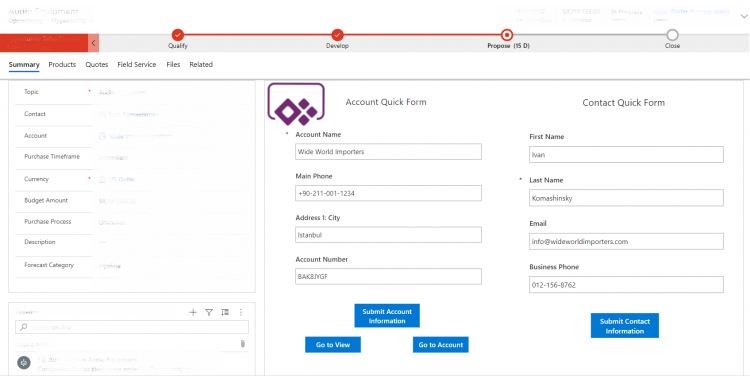
In this Article, discover Canvas App embedded Model-Driven App. How to do it and it's a great alternative to the dev of custom web resources for your Forms.
Let's have a look at solution component Environment Variable Definition and Environment Variable Values. We took this blog from November 2019 that introduced us to this new solution components and put it to the test in regards of deployment. Environment Variable Definitions and Values are used to handle environment specific configurations - for example webhooks that differ from dev, test or production.
Ready to use PowerShell scritps based on xrm-ci-framework toolbox to automate daily D365/PowerApp tasks. Runnable on every platform (Azure DevOps, Jenkins, GitLab).
UI Flows allow to create automation processes that perform actions directly in the User Interface of a computer, just as a human would do! UI Flows can be integrated in traditional Power Automate Flows. You can create automation processes involving any kind of applications, regardless of their available APIs. Discover more about it in this Chronicle!
Canvas Apps are part of the famous Power Apps suite. They allow to create Business apps with a low-code platform, making it available to a large audience. When used well, it can save a significant amount of development time. Canvas Apps are presented here, with some personal feedback on the power and limits of the tool.
Power Automate is a low-code tool that allows creating automated workflows between application and services to synchronise files, get notifications, collect data and more. It is made for a wide audience, and allows to save a lot of time compared to a fully custom development. This article will present you this great tool.